

Ridesharing in Southeast Asia: Best Apps & eSIM Guide for Travellers (2026) | TravelGator
Planning a trip to Southeast Asia? Whether you're island-hopping in Thailand, café-crawling in Bali, or navigating the organised chaos of Kuala Lumpur, one thing is certain: ridesharing apps are your best friend. Forget haggling with taxi drivers or standing in the heat waiting for a bus — in SEA, a tap on your phone gets you a ride in minutes.
But which apps do you actually need? And how do you get them working without a local SIM? This guide covers everything — from the dominant platforms in each country to how a TravelGator eSIM keeps it all running smoothly, so you can ride stress-free from the moment you land.
Grab: Southeast Asia's Ridesharing Heavyweight
Photo credit: Grab

Image created with AI Tools
If you only download one app before your SEA trip, make it Grab. Operating across Thailand, Malaysia, Vietnam, Indonesia, the Philippines, and Singapore, Grab is the region's undisputed super-app — part Uber, part food delivery, part digital wallet.
For travellers, Grab ticks every box:
- Upfront fares — no meter surprises
- Cashless payments via card or GrabPay
- In-app driver tracking and trip sharing
- Multiple ride types: economy, premium, motorcycle (GrabBike)
- Airport pick-ups in most major cities
Grab's wide footprint means you can use one familiar app whether you're in Bangkok one week and Penang the next. Set it up once, and it works across borders.
Gojek: The Indonesian Giant Worth Installing

Photo credit: Blog | Gojek Singapore
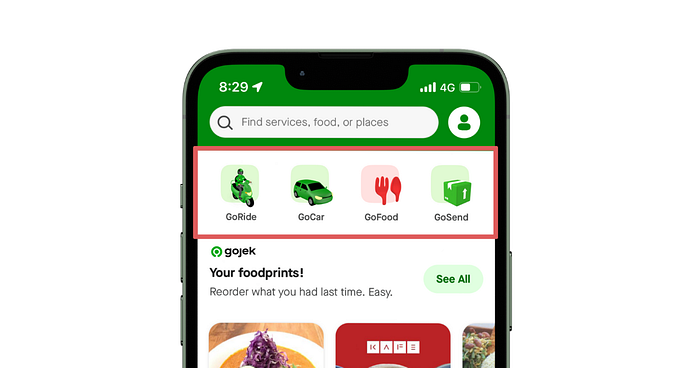
Photo credit: Noriko Matsunaga , Medium

Image created with AI Tools
Born in Jakarta, Gojek has grown into a full-on lifestyle platform — and if your itinerary includes Indonesia, Vietnam, or Singapore, it deserves a spot on your phone alongside Grab.
Beyond rides, Gojek lets you order food (GoFood), send parcels (GoSend), and even pay bills — all from a single app. In Indonesia especially, GoRide (motorcycle taxis) are a lifeline for beating city traffic at a fraction of the cost of a car.
Pro tip: In cities like Jakarta and Ho Chi Minh City, a GoRide motorcycle taxi during rush hour will get you there significantly faster than a car — and for far less.
Other Apps to Know by Country

Photo credit: Udara Karunarathna , Unsplash
Grab and Gojek cover most of the region, but a few local players are worth knowing:
- Bolt (Thailand): A strong Grab alternative in Bangkok, often with competitive fares. Worth installing as a backup during peak surge pricing.
- Ryde & Tada (Singapore): Peer-to-peer platforms with no surge pricing — popular with locals and savvy travellers who know the trick.
- InDriver (Multiple countries): Lets you name your own fare and negotiate with drivers — useful if you're travelling on a tight budget.
Our recommendation: download Grab as your primary app, then add one local alternative for your specific destination as a backup.
Do You Need a Local SIM to Use Ridesharing Apps?

Image created with AI Tools
Short answer: no. This is one of the most common misconceptions among first-time SEA travellers, and we're here to clear it up.
Ridesharing apps like Grab and Gojek require a phone number for account registration — but it does not have to be a local Southeast Asian number. Your existing home number from Singapore, the UK, Australia, the US, or anywhere else works perfectly fine, as long as it can receive an international SMS for the one-time verification code.
How SMS Verification Works
When you first sign up, the app sends a one-time passcode (OTP) via SMS to your registered number. Enter the code, and you're in. After that, the app communicates through its own in-app chat and data connection — no more SMS needed.
The smart move: Register your Grab and Gojek accounts before you leave home, using your regular number on your home network. This eliminates any verification headaches the moment you land.
What If My Number Can't Receive International SMS?
If your home carrier blocks international SMS, you have a few options:
- Temporarily enable international roaming on your primary SIM just to receive the one verification SMS
- Use a secondary number (Google Voice, WhatsApp Business number, etc.) if the app supports it
- Pick up a cheap local SIM at the airport — many travellers do this anyway for voice calls
That said, most modern mobile plans handle international SMS without any issues. Check with your carrier before you go.
How TravelGator eSIM Keeps Your Ridesharing Apps Running

Image created with AI Tools

Image created with AI Tools
Here's the piece most travel guides skip: even if your phone number and account registration are sorted, your ridesharing apps are useless without a data connection. Booking a Grab, tracking your driver, chatting in-app — all of it runs on data.
This is exactly where TravelGator eSIM comes in.
TravelGator offers affordable data-only eSIM plans across Southeast Asia — from as little as SGD $1.10 for Malaysia — with true no-speed-reduction and no daily data cap. You get fast, reliable connectivity from the moment you land, without hunting for a SIM card stall or paying sky-high roaming rates.
The Ideal Setup for SEA Travel
Here's the combination that works seamlessly:
- Keep your primary SIM active (with data roaming off) — ready to receive OTP SMS and calls
- Set TravelGator eSIM as your data line — all app activity routes through this
- Enable Dual SIM Dual Standby (DSDS) on your phone so both run simultaneously
This setup means you avoid expensive roaming fees, keep your home number reachable for verification codes, and stay connected to Grab, Gojek, Google Maps, and everything else throughout your trip.
No need to remove your primary SIM. TravelGator eSIM installs digitally — scan a QR code, activate, and you're done. No physical swapping, no risk of losing a tiny SIM card in your luggage.

Image created with AI Tools

Image created with AI Tools
Tips for a Smooth Ridesharing Experience in Southeast Asia

Image created with AI Tools
1. Set Up Your Apps Before You Board
Download Grab, Gojek, and any destination-specific apps before leaving. Complete registration on your home Wi-Fi using your primary number. By the time you land, your account is verified, your payment method is saved, and you can book a ride within 60 seconds of clearing customs.
2. Save Your Accommodation Addresses in the App
Before you travel, save your hotel or Airbnb addresses as favourites in Grab. This saves time and avoids the fumbling-for-your-phone-notes moment when you're tired from a long flight and just want to get to your room.
3. Have a Backup Plan for Connectivity
Connectivity hiccups happen. Build these into your trip:
- Offline maps: Download your destination city in Google Maps before you land. You can navigate even with no signal.
- Hotel/café Wi-Fi: Know where your nearest reliable Wi-Fi is as a fallback.
- Local cash: Even with a fully cashless setup, keep a small amount of local currency for traditional tuk-tuks, ferries, or remote areas where apps don't operate.
4. Communicate Clearly With Your Driver
Use the in-app chat for all driver communication. For pick-up locations in malls, airports, or busy streets, screenshot the pick-up pin and share it via chat if needed. Translation tools like Google Translate work well for quick messages — just type in English and paste the translated version.
5. Check Local Norms for Ride Types
In some cities, motorcycle taxis (GrabBike, GoRide) are the fastest and cheapest option but may feel unfamiliar. In others, car rides are more practical. Do a quick check before arrival — many traveller communities on Reddit and Facebook have up-to-date advice on which ride type is best in each city.
Frequently Asked Questions

Can I use Grab or Gojek without a local SIM card?
Yes. You only need your home phone number to receive the one-time SMS verification when you register. After that, you need a data connection (like a TravelGator eSIM) to use the app — but no local SIM is required.
Does TravelGator eSIM come with a phone number?
TravelGator eSIMs are data-only plans. They do not include a local phone number, which is actually the ideal setup — you keep your home number for OTP codes, and use TravelGator for data. Best of both worlds.
Which countries does TravelGator cover in Southeast Asia?
TravelGator covers all major SEA destinations including Thailand, Malaysia, Indonesia, Vietnam, the Philippines, Singapore, and more. Plans start from SGD $1.10 and can be topped up without deleting and reinstalling — just add more data when you need it.
Is it safe to use ridesharing apps in Southeast Asia?
Grab and Gojek are widely considered the safest way to travel by road in Southeast Asia. Both platforms offer driver ID verification, live trip tracking, in-app emergency features, and cashless payments — significantly safer than flagging down unmarked taxis, especially at night or in unfamiliar areas.
What if I'm travelling across multiple SEA countries?
Consider TravelGator's regional Southeast Asia plan — a single plan that gives you data connectivity across multiple countries without needing to swap or buy new eSIMs at each border. Perfect for island-hopping or multi-country itineraries.
Ready to Ride? Start With TravelGator eSIM

Image created with AI Tools
Southeast Asia rewards the prepared traveller. Get your Grab and Gojek accounts set up before you fly, pair them with a TravelGator eSIM for reliable data connectivity, and you'll be booking rides confidently from the moment you step off the plane — no queues, no haggling, no roaming bill shock.
TravelGator eSIM plans for Southeast Asia start from just SGD $1.10, with true full-speed data, no daily caps, and easy top-ups when you need more. Install your eSIM before departure and travel with one less thing to worry about.
→ Browse TravelGator eSIM Plans for Southeast Asia
Travel Later, TravelGator! 🐊